BenQ GW2790QT monitorProductivity~$300

BenQ

BenQ GW2790QT

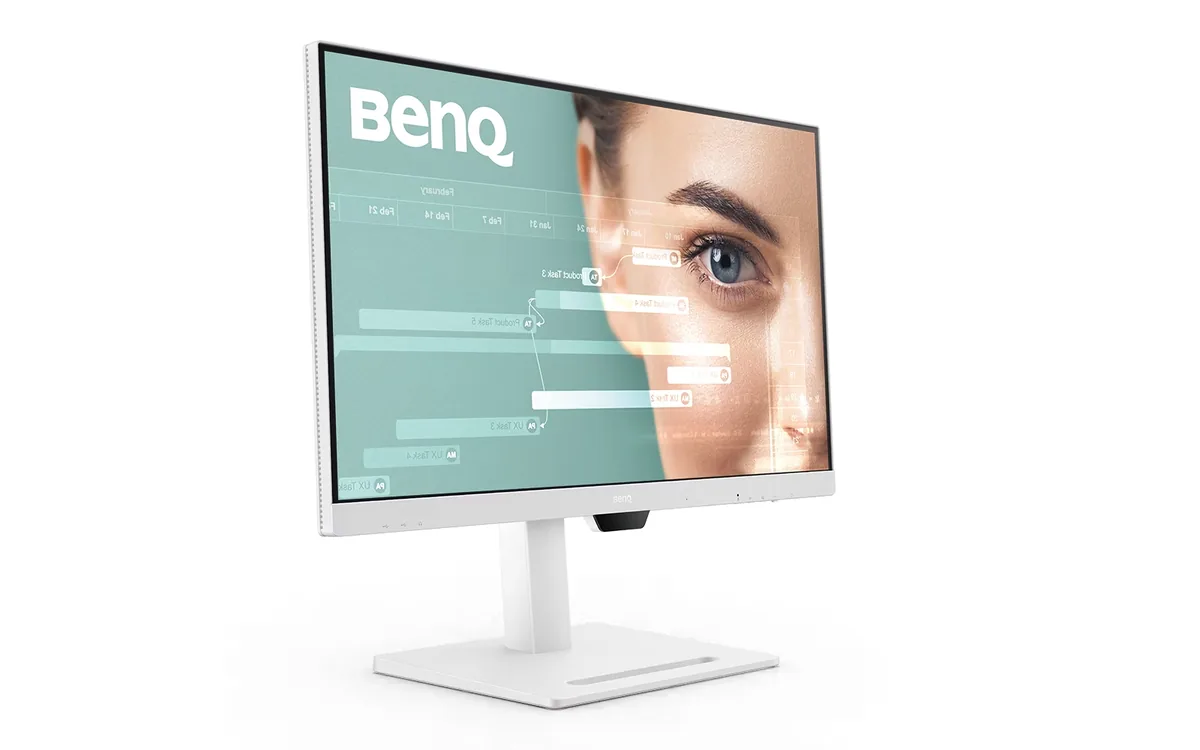
White, quiet and built around one USB-C cable, this is a video-call monitor before it is anything else: the microphone has noise cancellation, the speakers have a noise filter, and an ambient sensor trims brightness as the room changes. The panel is a plain 27-inch 1440p IPS at 75 Hz covering 99% of sRGB — no wide gamut, no HDR badge, no adaptive sync. What you get instead is 65 W of charging, a four-port hub, DisplayPort daisy-chaining and a stand that pivots to portrait.

Approx. price

~$300

snapshot, not a live price

Sharpness

46ppd · sharp

text is clean; pixel edges show if you look for them

HDR tier

No HDR

the maker makes no HDR claim for this panel

Peak brightness

350nits claimed

no HDR certification

USB-C power

65 W

holds a 13-inch ultrabook at a steady charge

Max refresh

75 Hz

5 ms GtG rated

Port speed — can each input carry this panel?

  • HDMI 1.4· full speed
  • DisplayPort 1.2· full speed
  • USB-C (DP Alt Mode)· full speed

This panel needs 8.0 Gbps at 2560×1440, 75 Hz and 24 bits per pixel, with no DSC to fall back on.

Best for: A home-office desk where the laptop docks with one cable and the calls never stop

Specifications

Approx. price
~$300
Type
Productivity
Resolution
2560×1440
Pixels per degree
46 — sharp
Finish
matte
VRR
None
HDR tier
No HDR
Peak brightness
350 nits claimed
Colour gamut
81% DCI-P3
HDMI
1 × HDMI 1.4
DisplayPort
1 × DisplayPort 1.2
DSC
Not supported
Port speed
3 of 3 inputs at full speed
USB-C
Video in over USB-C
USB-C power
65 W — Thin-and-light laptop
KVM
None
USB hub
4 ports
Speakers
Built in
Stand
height, tilt, swivel, pivot
VESA
100x100
Weight
18.5 lb
Released
2023
$ per inch
$11
$ per megapixel
$81

Features

  • 65 W USB-C single-cable docking with DisplayPort daisy-chain
  • Noise-cancelling microphone and noise-filtered speakers
  • Brightness Intelligence Gen2 ambient light sensor
  • Four downstream USB ports including a USB-C
  • ePaper and Coding display modes
  • Height, tilt, swivel and 90-degree pivot

What it does well

  • One USB-C cable carries video, data and 65 W of charging, which covers most 13- and 14-inch laptops outright
  • The noise-cancelling microphone means calls work without a headset, and the speakers are filtered rather than tinny
  • DisplayPort MST daisy-chaining lets a second monitor run off this one instead of back to the laptop
  • 109 pixels per inch is the density where 1440p text looks clean at 27 inches without any scaling
  • Full four-way stand including portrait pivot, which suits long documents and code
  • The ambient sensor genuinely reduces eye fatigue over a long day by tracking room light

What it gives up

  • 75 Hz, 5 ms and no adaptive sync at all — this is not a monitor to game on
  • 99% sRGB and no wide-gamut mode, so print or video colour work needs something else
  • HDMI here is 1.4, with only just enough headroom for 1440p at 75 Hz and none for anything past it
  • No HDR support of any kind, not even the DisplayHDR 400 badge its rivals carry

The two lists above come from the maker’s specifications and from published third-party measurements, not from owner reports. Where owner discussion has been read it appears in its own section below, so the two are never mistaken for each other.

What owners say

Two monitors in BenQ's range sit one letter apart, and choosing between them causes more confusion than any spec sheet should. The cheaper one runs faster and has better contrast. This one runs at 75 Hz with ordinary contrast, costs substantially more, and sells anyway — because it adds USB-C charging, a daisy-chain output, a noise-cancelling microphone, a stand that pivots to portrait, an ambient light sensor, and a white finish.

That sensor is the crux. Buyers pick this panel over an ASUS ProArt specifically to get automatic brightness, and knowingly give up refresh rate for it. When it behaves, it is the feature they wanted. One owner found his sensor plainly working — block it with a hand and the screen dims at once — while refusing to respond to the room's actual lighting, which no reset fixed. Worth knowing before you pay the premium for that one capability.

The buyer it fits is specific and common: somebody who codes, reads or runs calls for eight hours or more, wants a laptop docked with one cable, and values eye comfort over colour gamut and speed. Anyone doing colour-critical design work, or who would rather have 100 Hz and deeper blacks for less money, should look at the cheaper sibling or a ProArt instead.
What owners like

  • The ambient light sensor is the reason people choose it, and when it works it is exactly what buyers wanted: the screen tracks the room instead of being adjusted by hand twice a day. Shoppers comparing it against an ASUS ProArt accept its lower refresh rate specifically to get that feature
  • One cable does everything — 65 W of charging to a laptop, video, the USB hub, and a daisy-chain output to a second monitor. Owners costing the difference against the cheaper model in the range worked out that USB-C, the microphone, the arm-grade stand and the daisy chain came to more than the price gap
  • BenQ keeps updating the companion software, and owners notice. One posted approvingly about a new version adding software dimming below the panel's own minimum brightness, which is a real problem solved for anyone working at night
  • The stand raises, tilts, swivels and pivots to portrait, which is why it shows up on shortlists from people reading papers and code for ten to fourteen hours a day rather than from gamers
  • It comes in white, front bezel included, and that puts it on lists where it otherwise would not belong — buyers assembling all-white setups have a genuinely short list of 27-inch QHD options

Common complaints

  • The automatic brightness does not always work as sold. One owner found the sensor demonstrably alive — covering it dimmed the screen instantly — yet the panel stayed at full brightness when the room lights went out, surviving an OSD reset, which is a maddening fault in the one feature he paid extra for
  • 75 Hz and 1000:1 contrast, while the cheaper model a letter away in the same family runs 100 Hz at 1500:1. Buyers find this genuinely confusing and ask how the cheaper monitor has better numbers; the honest answer is that you are paying for the dock and the sensor, not the panel
  • It costs noticeably more than its specs suggest — one shopper put the premium at roughly 40 percent over the cheaper sibling, and another dismissed it outright as overpriced for what it offers
  • Colour gamut is ordinary. It covers sRGB well and not much beyond it, so buyers doing design work end up comparing it with ProArt panels and choosing those when colour matters more than eye comfort
  • The speakers are only adequate. A buyer comparing it with a Lenovo rival noted the Lenovo's are more powerful, and audio is not a reason anyone picks this screen

Questions owners ask about the BenQ GW2790QT

Does the automatic brightness actually track the room, or is it a gimmick?

Mostly it works, and it is the main reason buyers pay the premium — but not universally. One owner's sensor responded instantly to a hand placed over it while ignoring the room lights going off, and survived an OSD reset unchanged. If you are buying it chiefly for that feature, test it properly on the first evening: turn the room lights off and watch whether the panel follows within a minute or two.

Why does the cheaper model in the same range have better specs?

Because you are not paying for the panel. The cheaper one is faster and has higher contrast; this one adds USB-C with charging, daisy-chaining to a second screen, a built-in microphone, an ambient light sensor and a full ergonomic stand. Buyers who priced those separately — a monitor arm, a USB dock, a desk microphone — concluded the bundle costs less than assembling it. Buyers who need none of them are better served by the cheaper model.

Can it dim enough for working at night?

The panel's own minimum was low enough to satisfy most owners, and BenQ's companion software later added a software dimming layer that goes below it — an owner posted specifically to praise that update. That matters if you work in a dark room, where a lot of monitors bottom out too bright. Pair it with a bias light behind the screen rather than dimming to nothing, which is easier on the eyes than a very dark panel in a dark room.

Is it good enough for graphic or design work?

For layout, UI work and anything delivered in sRGB, yes. For colour-critical work, no — its gamut does not stretch far past sRGB, and buyers who do design repeatedly end up choosing an ASUS ProArt or similar instead once colour enters the requirements. The trade they are making is explicit in those threads: comfort features here, colour coverage there.

Will one cable really run my laptop?

Yes, within limits. 65 W covers most thin laptops and many 14-inch machines under load, along with video and the USB hub on the same cable; a power-hungry 16-inch laptop may charge slowly while working hard. The daisy-chain output also lets a second monitor run from that same connection, which is the setup owners buying it for a home office are usually after.

Others in the same part of the catalog

BenQ MOBIUZ EX2710Q monitor
BenQ~$400

BenQ MOBIUZ EX2710Q

27″ · 2560×1440 · 165 Hz · IPS

Sharpness
46ppd · sharp
HDR
Accepts an HDR signal
USB-C power
No USB-C power
  • 165 Hz 1440p IPS
  • 2.1 audio with woofer
  • Around $400

Best for: A single-monitor console-and-PC desk with no room for speakers

BenQ ZOWIE XL2566X+ monitor
BenQ~$650

BenQ ZOWIE XL2566X+

24.1″ · 1920×1080 · 400 Hz · TN

Sharpness
38ppd · visible pixels
HDR
No HDR
USB-C power
No USB-C power
  • 400 Hz Fast-TN
  • DyAc 2 strobing

Best for: Tournament-style FPS practice where motion clarity outranks everything else

BenQ PD2706U monitor
BenQ~$580

BenQ PD2706U

27″ · 3840×2160 · 60 Hz · IPS

Sharpness
68ppd · retina-class
HDR
Accepts an HDR signal
  • 4K at 163 PPI
  • 90 W USB-C
  • KVM + 4-port hub

Best for: A designer who wants one cable to a laptop and calibrated colour out of the box

More from BenQ →

← Back to the catalog