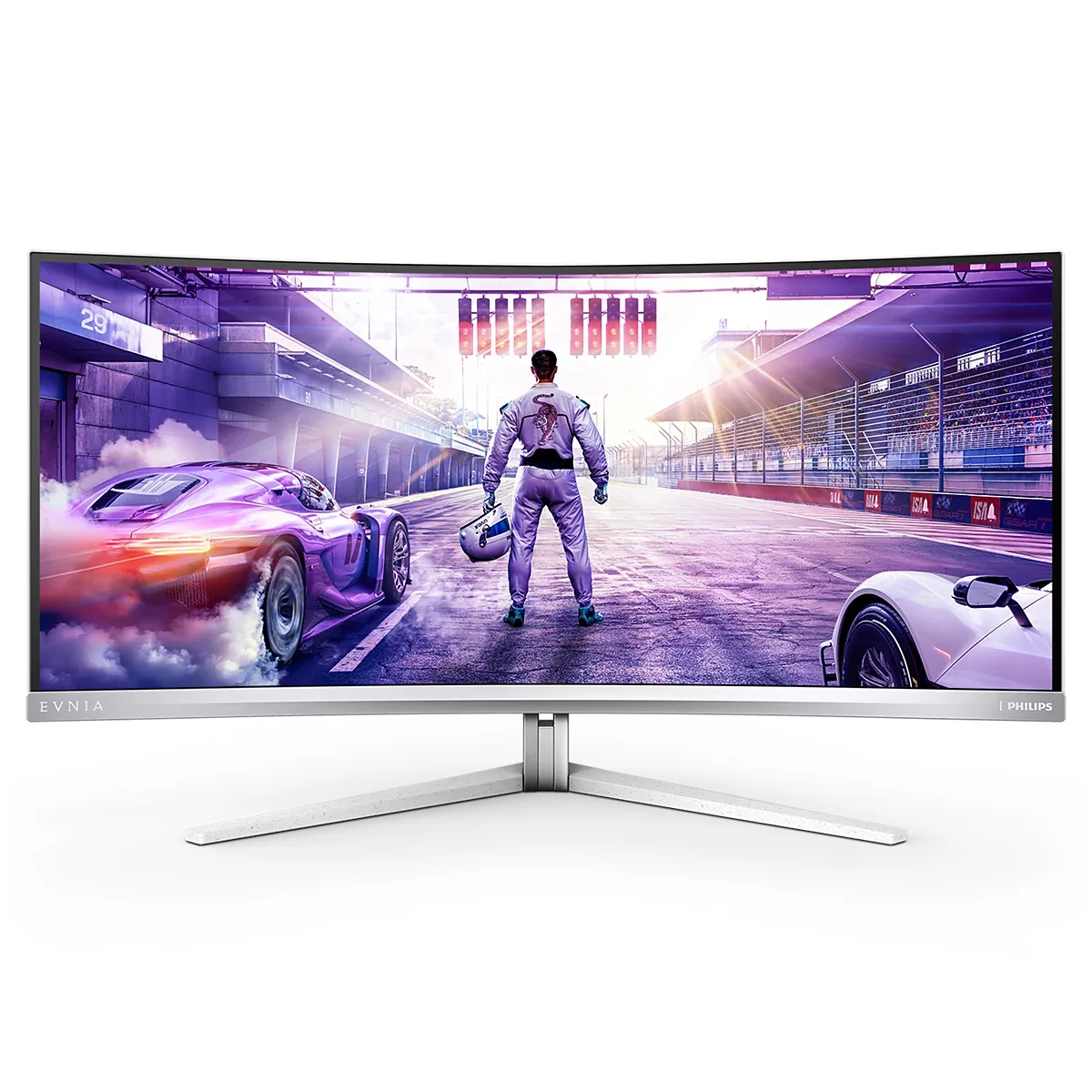
Philips Evnia 34M2C8600 monitorUltrawide

Philips

Philips Evnia 34M2C8600

Philips reached the 34-inch QD-OLED format in the same wave as Alienware and MSI, then spent its differentiation budget somewhere nobody else did: a 90 W USB-C dock, a KVM switch, DTS-tuned speakers and four-sided Ambiglow that throws screen-matched light onto the wall behind. In white and silver rather than black plastic, it is also the only ultrawide OLED here that does not look like a gaming monitor. The panel underneath is the familiar Samsung Display part — 3440×1440, 175 Hz, 0.1 ms, glossy.

Sharpness

46ppd · sharp

text is clean; pixel edges show if you look for them

HDR tier

Real HDR

per-pixel emissive — every pixel is its own backlight, so a highlight can sit beside true black

Peak brightness

1,000nits claimed

DisplayHDR True Black 400

USB-C power

90 W

keeps a 14-inch machine charged under normal load

Max refresh

175 Hz

0.1 ms GtG rated

Port speed — can each input carry this panel?

  • 2×HDMI 2.0· below the panel's maximum
  • DisplayPort 1.4· full speed(DSC)
  • USB-C (DP Alt Mode)· full speed(DSC)

This panel needs 31.2 Gbps at 3440×1440, 175 Hz and 30 bits per pixel, and supports DSC compression.

Best for: One ultrawide OLED that also docks a work laptop and lights the wall

Specifications

Type
Ultrawide
Resolution
3440×1440
Pixels per degree
46 — sharp
Panel
QD-OLED
Finish
glossy
Response time
0.1 ms GtG
VRR
Adaptive-Sync
HDR tier
Real HDR
HDR certification
DisplayHDR True Black 400
Peak brightness
1,000 nits claimed
Local dimming
Per-pixel (emissive)
Static contrast
effectively infinite
Colour gamut
99.3% DCI-P3
HDMI
2 × HDMI 2.0
DisplayPort
1 × DisplayPort 1.4
DSC
Supported
Port speed
2 of 3 inputs at full speed
USB-C
Video in over USB-C
USB-C power
90 W — 14-inch class laptop
KVM
Built in
USB hub
4 ports
Speakers
Built in
Stand
height, tilt, swivel
VESA
100x100
Weight
19.2 lb
Released
2023

Features

  • Samsung Display QD-OLED, 3440×1440 at 175 Hz
  • 90 W USB-C docking with a four-port USB hub and KVM switch
  • Four-sided Ambiglow bias lighting matched to screen content
  • DisplayHDR True Black 400 with per-pixel emission
  • 2×5 W DTS-tuned speakers
  • Three years of warranty covering panel burn-in

What it does well

  • A 90 W USB-C dock and a KVM switch on an OLED ultrawide, which most rivals leave out entirely
  • Per-pixel emission on a 1800R curve — black is black across the whole width
  • Glossy QD-OLED surface holds colour saturation that matte coatings visibly dull
  • Ambiglow genuinely reduces eye strain in a dark room, unlike most RGB lighting
  • Three years of warranty that covers burn-in, the only warranty question that matters on OLED
  • White-and-silver housing instead of the usual black gaming shell

What it gives up

  • HDMI 2.0 caps console input at 3440×1440 and 100 Hz; the full 175 Hz needs DisplayPort or USB-C
  • Around 250 nits full-field in SDR, and a glossy panel mirrors any window behind you
  • First-generation QD-OLED subpixels raise black levels under direct room light
  • 46 pixels per degree — the same pixel density as a 27-inch 1440p panel, with the extra pixels spent on width rather than sharpness
  • The stand lifts and swivels but will not rotate, which an ultrawide would not want anyway

The two lists above come from the maker’s specifications and from published third-party measurements, not from owner reports. Where owner discussion has been read it appears in its own section below, so the two are never mistaken for each other.

What owners say

The story here is money. Buyers work out, usually part-way through their shopping, that the QD-OLED inside this is the same one in the ultrawides they had actually shortlisted, and that this one costs meaningfully less — often several hundred dollars less on clearance or open-box. Add a KVM, 90W USB-C and a USB hub and you have the rare OLED that people buying primarily for work rather than play can justify, which is why so many of the questions here come from programmers weighing burn-in against features they cannot find on any IPS at the price.

When it lands well it lands hard. The owner report that travelled furthest is a two-month owner still stunned by how a game looks in HDR, and there is someone else who had used laptops their whole life showing off their first ultrawide with obvious delight. Long-term reports are reassuring too — an owner past 2,300 hours who runs the pixel refresh every few hours says uniformity is holding, with the usual caveat about watching 16:9 content on a 21:9 panel.

The faults cluster around the parts Philips added rather than the panel it bought. Ambiglow, the feature the brand markets hardest, stops following video the moment HDR is enabled and just glows white. The pixel refresh routine — the thing that protects the panel — refuses to start for several owners and throws an unfinished-process loop instead. USB-C is flaky enough that an owner with two units reports a roughly two-in-ten success rate connecting a laptop. There is no HDMI 2.1, so a PS5 is limited unless you run it over DisplayPort or USB-C, and the VESA adapter pushes the screen uncomfortably far forward on an arm. Check which variant you are buying, too: the /00 and /01 revisions, the cheaper 34M2C6500 and a newer 34M2C8600P with a fifth-generation panel all circulate under nearly the same name.
What owners like

  • It carries the same QD-OLED panel as the Alienware AW3423DWF and Samsung's G8 and reliably costs less — owners report paying $500 to $730 while the Dell and Samsung sat $150 to $300 higher, and the ones who noticed cannot work out why the others outsell it
  • The productivity kit is what closes the sale for people who work on the monitor: a KVM, 90W USB-C power delivery and a USB hub, which one shopper points out simply does not exist on a fast IPS panel at the same money
  • First-time OLED owners are genuinely startled by the HDR — the most widely-shared owner report about this monitor comes from someone two months in who says they had never seen a game use HDR like it
  • Three years of burn-in cover is part of why cautious buyers take the OLED plunge on this one rather than a shorter-warranty rival
  • The white chassis is a real reason people pick it; shoppers building white setups find their options collapse to two or three monitors and this is one of them
  • One owner past 2,300 hours of mixed gaming and film watching reports uniformity holding up well, having run the pixel refresh roughly every five hours

Common complaints

  • The pixel refresh routine misbehaves for multiple owners — the menu option throws an unfinished-process loop and refuses to run, sometimes after working fine for weeks, which is unnerving on a panel whose longevity depends on it
  • Ambiglow, one of the headline features, does not follow video while HDR is on; the LEDs just sit white, and at least one owner was returning the monitor over exactly this
  • No HDMI 2.1, and console owners feel it hardest: the PS5 gets 4K60 or 1080p120 over HDMI with 1440p120 available only through USB-C or DisplayPort, and an adapter did not rescue it for the owner who tried
  • The USB-C input is unreliable enough that an owner with two of these monitors says connecting a laptop for video and peripherals works about twice in ten attempts, with the monitor reporting no video input on both units
  • Mounting is awkward: the VESA adapter juts the panel forward by around five centimetres on an arm, and a shopper found it listed as incompatible with the Ergotron arm they had already chosen
  • Non-native resolutions get stretched to fill the ultrawide with no aspect-preserving option anyone could find, which bites when you load an older game

Questions owners ask about the Philips Evnia 34M2C8600

Why won't pixel refresh start from the menu?

Several owners describe the same behaviour: selecting pixel refresh blanks the screen and returns a message saying the refresh process is not finished, then does nothing whether you choose to continue or not. For one owner it succeeded about one time in five with no discernible pattern, and for another it worked for weeks before stopping. The forced refresh that triggers after long use generally still runs, and the maker's desktop utility can start it from Windows, which is the workaround owners fall back on.

Does Ambiglow work with HDR games?

No, and this is the complaint that makes owners return it. With any HDR profile active the lighting stops following the image and the LEDs stay a static white. Since HDR is how most people will use a QD-OLED, the feature effectively switches itself off in the mode you bought the monitor for. Shoppers have been asking whether the newer variants fix this and no owner has confirmed that they do.

Can I get 1440p at 120Hz on a PS5?

Only over USB-C or DisplayPort, not HDMI. The HDMI input is 2.0, so the console offers 4K at 60Hz or 1080p at 120Hz and stretches rather than scaling properly; one owner also found no VRR that way, despite the identically-panelled Alienware managing it. An HDMI-to-DisplayPort adapter bought to work around this delivered only 1080p for the owner who tried it.

Is the USB-C input dependable enough to dock a laptop?

Treat it as the weakest part of the monitor. An owner running two of these says a single USB-C cable carrying video and peripherals connects roughly two times in ten, with the monitor reporting no video input the rest of the time, on both units. It behaves better if the laptop is connected before the monitor is switched on; switching to USB-C while a desktop is live on DisplayPort reportedly never works.

How does it compare against the Alienware AW3423DWF?

The panel is the same and owners know it, so the decision comes down to what surrounds it. This one usually costs $100 to $300 less, adds speakers, a KVM, 90W USB-C and the Ambiglow lighting, and comes in white. The Alienware has the better-regarded support reputation and more owner reports to draw on. If the USB-C and KVM features are the reason you are buying, be aware those are exactly the parts of this monitor owners have trouble with.

Which version should I be looking for?

Check the suffix carefully, because at least four closely-named products circulate. Owners have asked what separates the /00 and /01 revisions with no clear answer, the 34M2C6500 is a different and often similarly-priced model that shoppers cannot find a comparison for, and Philips has since launched a 34M2C8600P built on a fifth-generation QD-OLED panel. Match the exact string on the listing to the reports you are relying on.

Others in the same part of the catalog

LG UltraGear 34GS95QE monitor
LG~$800

LG UltraGear 34GS95QE

34″ · 3440×1440 · 240 Hz · WOLED

Sharpness
46ppd · sharp
HDR
Real HDR
USB-C power
No USB-C power
  • 240 Hz 21:9
  • 800R curve
  • 98.5% DCI-P3
  • Console at full speed

Best for: A curved 21:9 gaming panel that still holds up for desktop work

Dell UltraSharp U3425WE monitor
Dell~$1,050

Dell UltraSharp U3425WE

34″ · 3440×1440 · 120 Hz · IPS

Sharpness
46ppd · sharp
HDR
No HDR
  • 21:9 at 120 Hz
  • Thunderbolt 4, 90 W
  • KVM
  • Console at full speed

Best for: A wide business desktop where two source machines share one keyboard

Alienware AW3425DW monitor
Alienware~$750

Alienware AW3425DW

34″ · 3440×1440 · 240 Hz · QD-OLED

Sharpness
46ppd · sharp
HDR
Real HDR
USB-C power
No USB-C power
  • 240 Hz 21:9 OLED
  • 2× HDMI 2.1
  • 3-year burn-in cover
  • Console at full speed

Best for: An ultrawide OLED where a console also needs full bandwidth

Every ultrawide monitor here →

← Back to the catalog