ASUS ROG Swift OLED PG34WCDM monitorUltrawide~$800

ASUS

ASUS ROG Swift OLED PG34WCDM

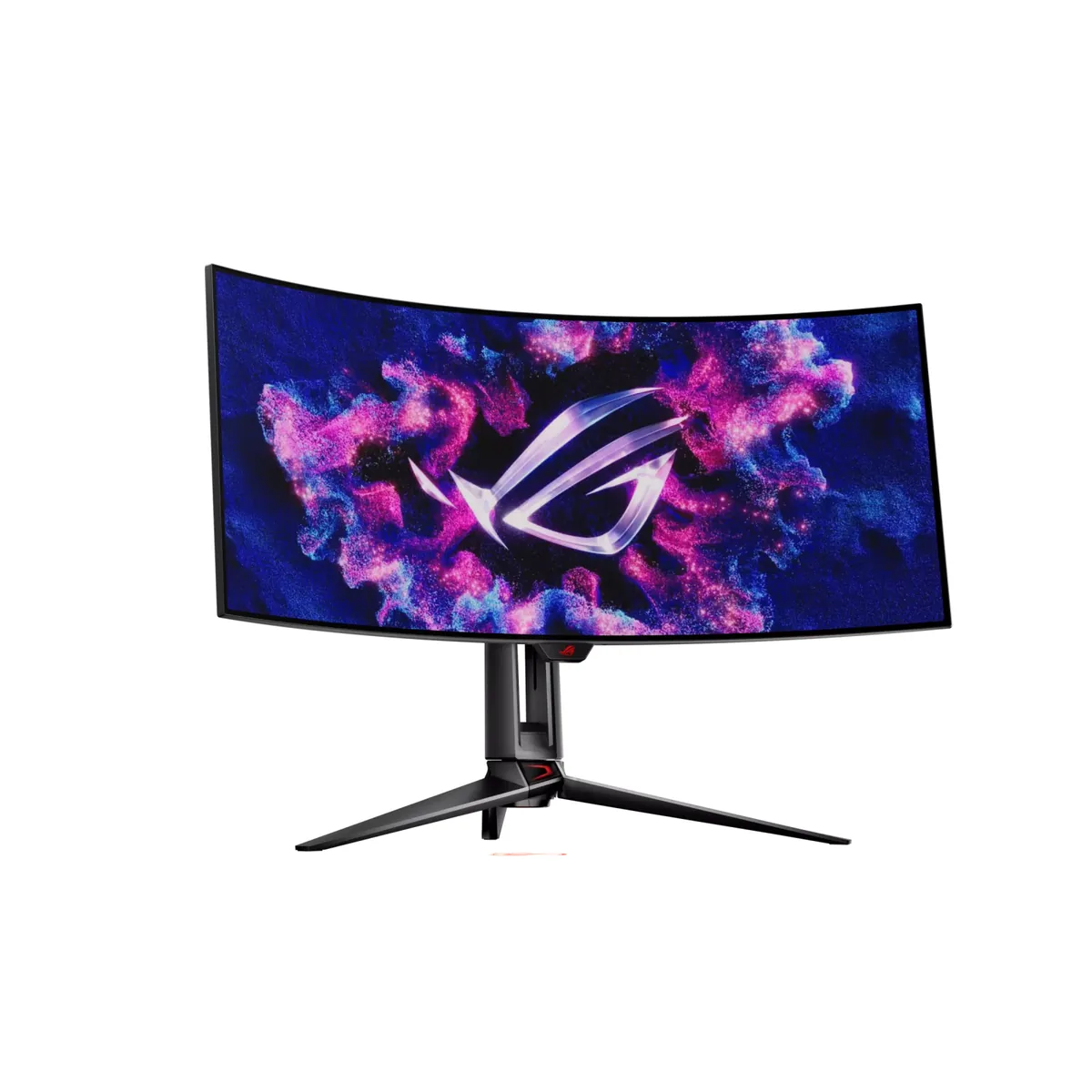
The curve is the point here: 800R rather than the usual 1800R, so the panel wraps rather than leans — the tightest anyone puts on a 34-inch ultrawide, matched in this catalog only by LG's 34GS95QE, which uses the same LG WOLED panel. TFTCentral measured 1,170 nits peak against a 1,300-nit claim: an optimistic box number, and still the highest measured peak of any OLED here apart from LG's 32GS95UE at 1,324.

Approx. price

~$800

snapshot, not a live price

Sharpness

46ppd · sharp

text is clean; pixel edges show if you look for them

HDR tier

Real HDR

per-pixel emissive — every pixel is its own backlight, so a highlight can sit beside true black

Peak brightness

1,300nits claimed1,170measured · TFTCentral

DisplayHDR True Black 400

USB-C power

90 W

keeps a 14-inch machine charged under normal load

Max refresh

240 Hz

0.03 ms GtG rated

Port speed — can each input carry this panel?

  • 2×HDMI 2.1· full speed(DSC)
  • DisplayPort 1.4· full speed(DSC)
  • USB-C (DP Alt Mode)· full speed(DSC)

This panel needs 42.8 Gbps at 3440×1440, 240 Hz and 30 bits per pixel, and supports DSC compression.

Best for: An immersive single-screen ultrawide for sims and first-person games

Specifications

Approx. price
~$800
Type
Ultrawide
Resolution
3440×1440
Pixels per degree
46 — sharp
Panel
WOLED
Finish
matte
Response time
0.03 ms GtG
VRR
G-Sync Compatible
HDR tier
Real HDR
HDR certification
DisplayHDR True Black 400
Peak brightness
1,300 nits claimed
Measured peak
1,170 nits · TFTCentral
Local dimming
Per-pixel (emissive)
Static contrast
effectively infinite
Colour gamut
99% DCI-P3
HDMI
2 × HDMI 2.1
DisplayPort
1 × DisplayPort 1.4
DSC
Supported
Port speed
3 of 3 inputs at full speed
USB-C
Video in over USB-C
USB-C power
90 W — 14-inch class laptop
KVM
Built in
USB hub
3 ports
Speakers
None
Stand
height, tilt, swivel
VESA
100x100
Weight
18.5 lb
Released
2024
$ per inch
$24
$ per megapixel
$161

Features

  • 800R curved 34-inch WOLED
  • 240 Hz with 0.03 ms response
  • Two HDMI 2.1 inputs
  • USB-C with 90 W power delivery and a Smart KVM
  • Two-year burn-in warranty

What it does well

  • TFTCentral measured 1,170 nits at a small window, second here only to LG's 32-inch
  • 800R is twice the curve of a normal 34-inch ultrawide, and at desk distance the difference is obvious
  • Two HDMI 2.1 ports, so a console gets the full ultrawide resolution
  • Ninety watts of USB-C and a Smart KVM, so one cable runs a work laptop and the keyboard follows it

What it gives up

  • Measured 1,170 nits against a 1,300-nit claim, so the box number is optimistic
  • 800R is wrong for anything with straight lines — spreadsheets and layout work look bent
  • Burn-in cover runs two years, where most of the OLEDs in this catalog carry three
  • Eight hundred dollars at the lowest figure any review states, and the stand still will not turn to portrait

The two lists above come from the maker’s specifications and from published third-party measurements, not from owner reports. Where owner discussion has been read it appears in its own section below, so the two are never mistaken for each other.

What owners say

This is the 34-inch ultrawide people buy for the curve. At 800R it wraps rather than leans, and the interesting thing in the owner reports is how consistently the anxiety about that curve turns out to be misplaced — the buyers who were nervous in advance generally report it being a non-issue, especially those arriving from Samsung's aggressively curved panels.

What does trip people up is the panel technology and the ports. Several buyers got deep into research believing they were ordering a glossy QD-OLED and caught it at the last moment; this is an LG WOLED, the same panel LG sells in its own 34-inch ultrawide, with a matte coating. That coating is the reason to buy it if your room is bright and the reason to skip it if your room is dark. On ports, an owner running a 4090 found the HDMI input capping at 180 Hz with the bundled cable and had to move to DisplayPort with compression to get the full 240 Hz — worth knowing if you were planning to keep DisplayPort free for something else.

The honest positioning: an excellent upgrade from IPS, a debatable one from a good mini-LED VA. An owner a week into ownership, replacing a Samsung mini-LED, liked it a lot and still questioned whether the picture justified what it cost in their market. Text is where WOLED gives ground, so if the same screen does long working days, factor that in before the gaming specs.
What owners like

  • The 800R curve worries buyers far more before they own it than after. One owner replacing an aggressively curved mini-LED Samsung reported the curve simply not bothering them, and getting used to the lower resolution faster than expected.
  • Build quality draws unprompted praise from owners coming off other high-end ultrawides — one specifically noted the absence of the creaking and crackling their previous panel made.
  • The KVM is the feature that wins it arguments. A buyer weighing it against a cheaper 49-inch Samsung named the KVM as the reason to pay more for a smaller screen.
  • The matte coating makes it the ultrawide OLED that works in a room you cannot darken, which is why it stays on shortlists next to glossy panels with better contrast figures.

Common complaints

  • HDMI does not reach 240 Hz in practice. An owner on a 4090 with the supplied cable topped out at 180 Hz over HDMI and had to use DisplayPort with compression enabled to get the advertised refresh rate.
  • One buyer went through two defective units from the same retailer, returned both, and switched brands rather than try a third.
  • Text clarity is the compromise. An owner who moved here from a mini-LED panel listed worse text for browsing and desktop work as their main regret, which is the WOLED subpixel arrangement rather than anything fixable.
  • Buyers repeatedly discover late in their research that this is a WOLED panel rather than QD-OLED and cancel — several were specifically hunting for a glossy third-generation QD-OLED ultrawide and nearly ordered this by mistake.
  • Coming from a good mini-LED VA rather than from IPS, the upgrade underwhelms. An owner a week in described the picture as great but not mind-blowing against their previous Samsung and openly questioned the price.
  • Burn-in cover runs two years, where the Alienware and MSI ultrawides on the same shortlists give three — buyers comparing warranties line by line notice.

Questions owners ask about the ASUS ROG Swift OLED PG34WCDM

Why can't I get 240 Hz over HDMI?

An owner with a 4090 hit exactly this and found the NVIDIA control panel offering no more than 180 Hz over HDMI with the supplied cable, while DisplayPort with Display Stream Compression enabled gave the full 240 Hz. Cable swaps did not change it. Use DisplayPort for the PC and make sure DSC is turned on in the monitor's menu; keep HDMI for a console, which does not need 240 Hz anyway.

Is this WOLED or QD-OLED, and is it the same panel as LG's 34-inch?

It is an LG WOLED panel, and buyers comparing it with LG's own 34-inch 800R ultrawide are right that the two share it. That matters because the two panel families behave differently: WOLED here comes with a matte coating and a white subpixel, which helps brightness in a lit room and hurts text sharpness. More than one buyer nearly ordered this while specifically shopping for a glossy QD-OLED, so check which you actually want first.

Is an 800R curve too aggressive?

The people who own it mostly say no, and that includes buyers who arrived from Samsung's more extreme curves and buyers who had never used a curved screen at all. Where it genuinely costs you is anything with straight geometry — spreadsheets, page layout, CAD — because the bend is deep enough to be visible on ruled lines. For games and film it reads as immersion rather than distortion.

Is it a real upgrade from a mini-LED ultrawide?

Less of one than from IPS. An owner a week into replacing a Samsung mini-LED reported liking the format, the newer technology and notably better build quality, while also saying the picture was not the leap they expected because mini-LED already does contrast well — and they questioned the price difference out loud. From IPS or from an older VA panel, the change is much more dramatic.

How is it for desktop work and reading text?

This is the weak spot. An owner comparing it directly with the mini-LED panel it replaced named text clarity in browsing and general desktop use as the main thing they lost. The cause is the WOLED subpixel arrangement, which Windows text rendering does not expect; the ClearType tuner helps and integer scaling helps, but it does not become an IPS panel. If the screen has to do long documents as well as games, that is the trade to weigh.

Others in the same part of the catalog

LG UltraGear 34GS95QE monitor
LG~$800

LG UltraGear 34GS95QE

34″ · 3440×1440 · 240 Hz · WOLED

Sharpness
46ppd · sharp
HDR
Real HDR
USB-C power
No USB-C power
  • 240 Hz 21:9
  • 800R curve
  • 98.5% DCI-P3
  • Console at full speed

Best for: A curved 21:9 gaming panel that still holds up for desktop work

Alienware AW3425DW monitor
Alienware~$750

Alienware AW3425DW

34″ · 3440×1440 · 240 Hz · QD-OLED

Sharpness
46ppd · sharp
HDR
Real HDR
USB-C power
No USB-C power
  • 240 Hz 21:9 OLED
  • 2× HDMI 2.1
  • 3-year burn-in cover
  • Console at full speed

Best for: An ultrawide OLED where a console also needs full bandwidth

ASUS ROG Swift OLED PG27AQDP monitor
ASUS~$999

ASUS ROG Swift OLED PG27AQDP

26.5″ · 2560×1440 · 480 Hz · WOLED

Sharpness
46ppd · sharp
HDR
Real HDR
USB-C power
No USB-C power
  • 480 Hz
  • WOLED
  • 3-year burn-in cover
  • Console at full speed

Best for: Competitive shooters where frame timing is the only spec that counts

More from ASUS →

← Back to the catalog